
Workflow Plus - Role Access Level
Role Access Level
Section titled “Role Access Level”In Synergy, you assign a role to a person at one of the following levels: Corporate, Group, Division, Cost Center Group, or Cost Center. This level determines the user’s access level in Synergy.
When a role is assigned at Division level and the request type is also linked at Division level, all requests within that division are assigned to the person(s) holding that role.
Example scenario
Section titled “Example scenario”Assume that within one division, one or more persons in the HR cost center should receive requests for the HR, IT, and Finance cost centers only, and not for Operations. The requirement is that only requests originating from HR, IT, or Finance should be assigned to the person(s) in the HR cost center.
With the standard implementation of role levels, this cannot be configured:
- If you set the role level to Division, requests for the Operations cost center will also be assigned to the person responsible for HR, IT, and Finance.
- If you set the role level to Cost Center Group, this would work only if HR, IT, and Finance are in the same cost center group, which they are not.
- If you set the role level to Cost Center, the request for cost centers HR, IT, and Finance would not be routed to the HR person(s), because the request is not scoped to a single cost center.
Role Access Level (Workflow Plus)
Section titled “Role Access Level (Workflow Plus)”The new Role Access Level (Workflow Plus) feature enables this configuration. For each role linked to a person, you can additionally assign:
- Division groups
- Divisions
- Cost center groups
- Cost centers
In this scenario, you can add the HR, IT, and Finance cost centers to the HR person’s role (which remains at Division level). As a result, the person will only receive requests when the request originates from the HR, IT, or Finance cost center, and not from Operations.
The screenshot below shows that two cost centers are assigned to the HR role at Division level for Gijs Lamers.

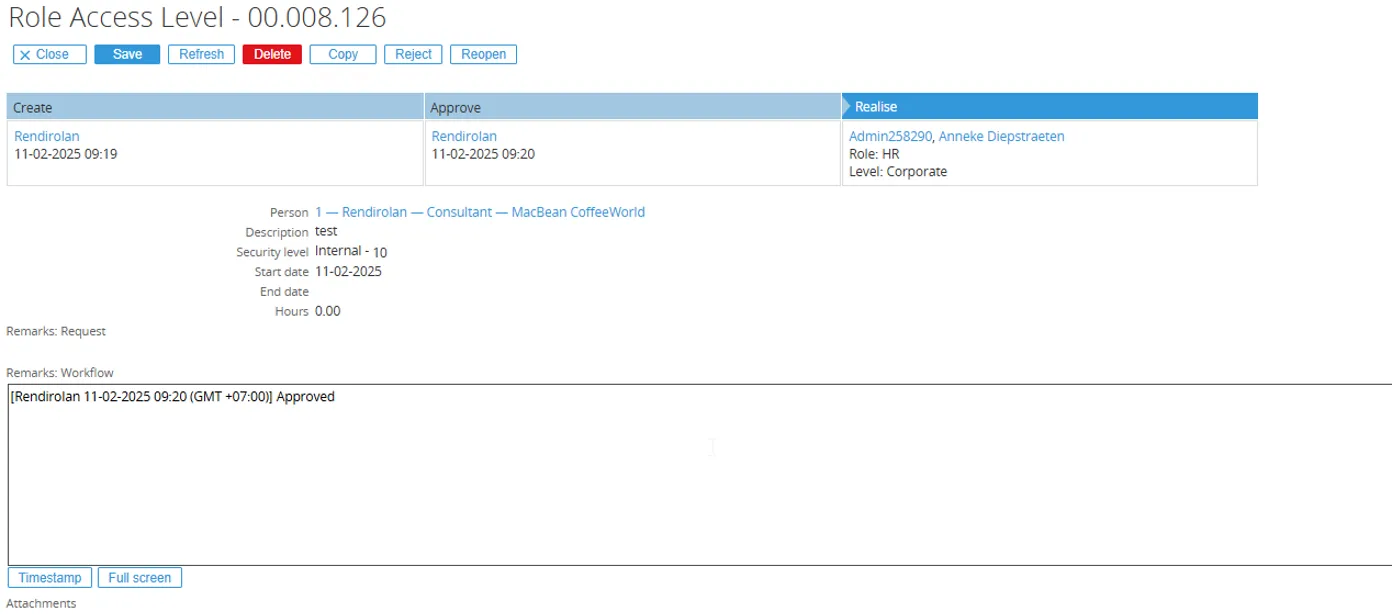
In the request, the Realize step is assigned to persons in the HR division role. The person linked to the request is not in the cost center linked to Gijs Lamers, so he will not be assigned to this request.
How the system assigns requests when Role Access Level is used
Section titled “How the system assigns requests when Role Access Level is used”When the Role Access Level (Workflow Plus) feature is used, the system applies the following logic:
- The system first checks whether there are any roles linked to the person that have Role Access Level configured.
- If there are no roles with Role Access Level linked to the person, the system then checks for roles without Role Access Level and assigns the request based on those roles.
- If there are roles with Role Access Level linked to the person, the system will only assign requests to this person when the request matches the division, division group, cost center, or cost center group that is linked to the role.