Project Plus - User Manual
Introduction
Section titled “Introduction”Project plus has 2 feature :
Free fields
Section titled “Free fields”Under the Project / Setup / Project menu there is the Free Fields hyperlink. This link includes the standard Project Card Free Fields and our additional Free Fields that are a part of this tool.
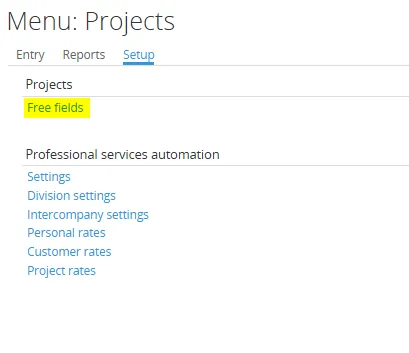
Standard in Synergy Enterprise, there is a limited set of free fields with limited functionality. Our tool extends the number and functionality of the free fields within this module. All the free field types have the same features as a standard free field but are enhanced as described below.
With this tool, we have added 180 new fields:
- 35 free text fields for a total of 40
- 45 free date fields for a total of 50
- 20 free yes/no fields for a total of 25
- 20 free number fields for a total of 25
- 25 free Numint fields for a total of 25
- 25 free GUID fields for a total of 25
- 10 free Comment fields for a total of al 10
Selecting Free Fields on the Project Card
Section titled “Selecting Free Fields on the Project Card”Add our Fields to the Project Card in the same manner that you would link the standard free fields to other Cards, such as Items, Contacts, Opportunities, Resources, or Projects.
Free Text Fields
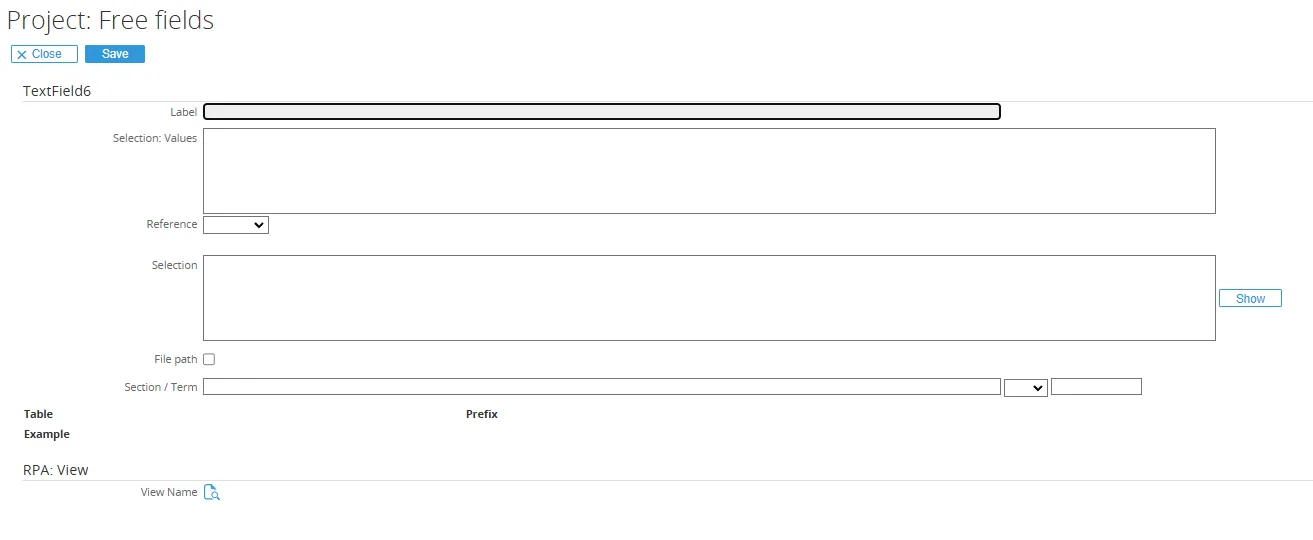
Section titled “Free Text Fields”All of the Free Text Fields for the Project Card are provided with more functionality than standard Synergy Enterprise. Including the standard 5 Free Text Field. Instead of just a label for the free field, we provide much of the same functionality that we use with our Workflow Plus module for Free Fields.
In the first selection box, a resource is allowed to create a drop-down list with values, similar to workflow requests.
The reference drop-down list allows this field to search for Items, Units, VATs, or Projects, with the following selection box to be used for filtering on the drop-down value selected.
The File Path checkbox makes it possible to store a file path on the Project Card to alert other Resources to the location of a related document, which is not stored in Synergy, but linked together.
To use this function, the Resource must be in the Edit mode of Project Card, at which time they are able to browse and select a specific path on the drive.
Free GUID Fields
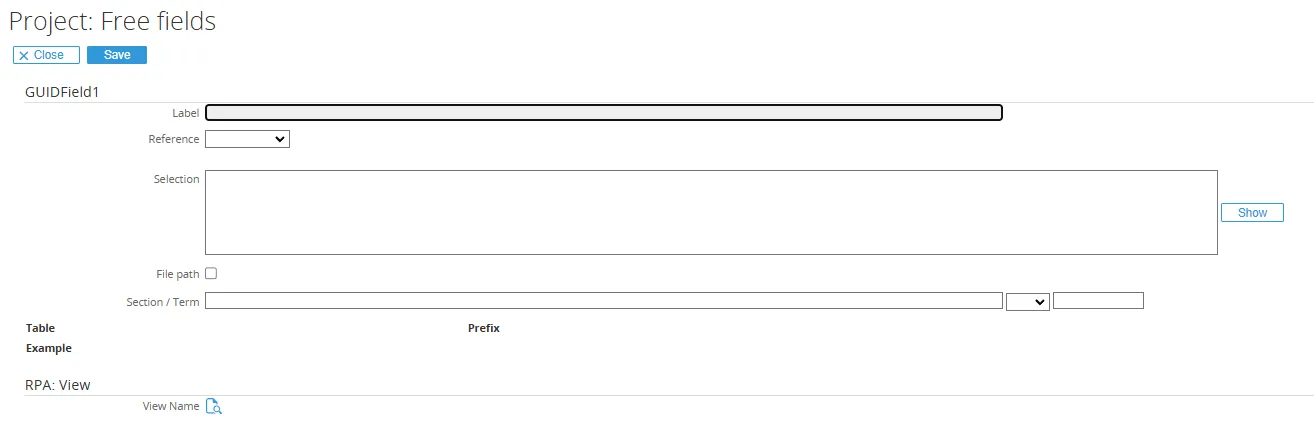
Section titled “Free GUID Fields”The reference drop-down list allows this field to search for requests, documents, Accounts, or Contacts, with the following selection box to be used for filtering on the drop-down value selected.
Free Number Integer Fields (NumIntFields)
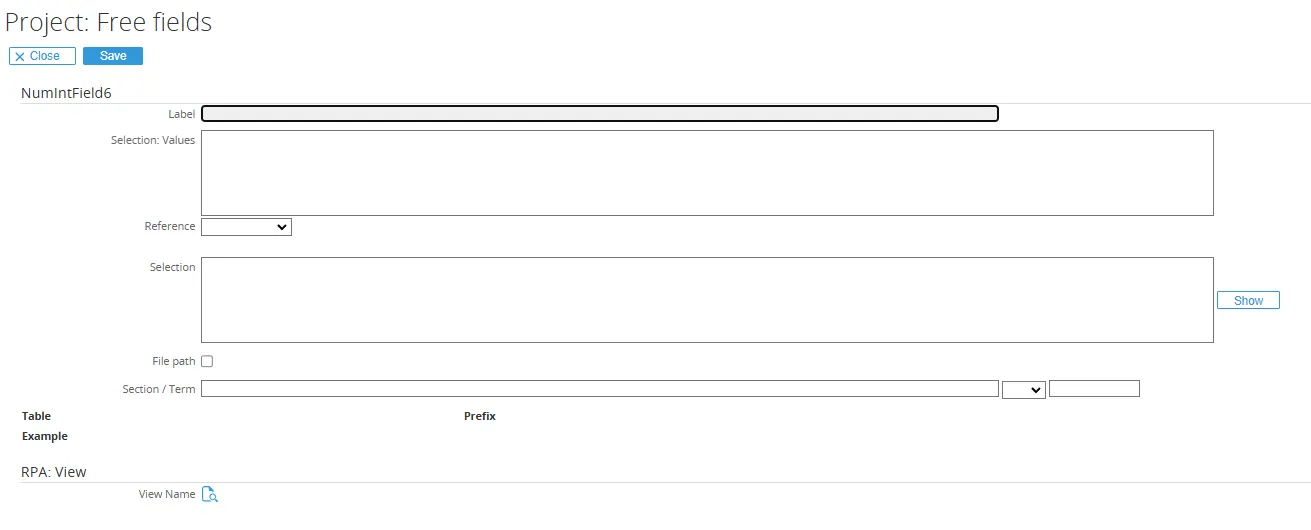
Section titled “Free Number Integer Fields (NumIntFields)”In the first selection box, a resource is allowed to create a drop-down list with values, similar to a workflow request.
The Reference drop-down list allows this field to search for people (Resources) or Assortment, with the following selection box to be used for filtering on the drop-down value selected.
Standard Synergy Searches
Section titled “Standard Synergy Searches”All of our Free Fields within this tool may be used in Standard Synergy Search Screens for both the Criteria and the Result Displayed.

Linking Free Fields for Reporting Purposes
Section titled “Linking Free Fields for Reporting Purposes”All of the Free Fields within our tool have been saved in the SQL table labelled “GLMSysProjects”
This table was created to allow for any modifications that Exact Software would make in their standard Project Card table (PRPProjects) would not affect the use of our tool.
To link any data from a Project using our Free Fields for reporting purposes, please use the following link:
PRProject -> GLMSysProjectsProjectNR -> ProjectCodeFree Fields Table and Field Names
Section titled “Free Fields Table and Field Names”All the Free fields with our tool are stored in the table GLMSysProjects
| Request Field Description in Free Fields Screen | Column Name in SQL Table |
|---|---|
| TextField6 | TextField6 |
| TextField7 | TextField7 |
| TextField8 | TextField8 |
| TextField9 | TextField9 |
| TextField10 | TextField10 |
| TextField11 | TextField11 |
| TextField12 | TextField12 |
| TextField13 | TextField13 |
| TextField14 | TextField14 |
| TextField15 | TextField15 |
| TextField16 | TextField16 |
| TextField17 | TextField17 |
| TextField18 | TextField18 |
| TextField19 | TextField19 |
| TextField20 | TextField20 |
| TextField21 | TextField21 |
| TextField22 | TextField22 |
| TextField23 | TextField23 |
| TextField24 | TextField24 |
| TextField25 | TextField25 |
| TextField26 | TextField26 |
| TextField27 | TextField27 |
| TextField28 | TextField28 |
| TextField29 | TextField29 |
| TextField30 | TextField30 |
| TextField31 | TextField31 |
| TextField32 | TextField32 |
| TextField33 | TextField33 |
| TextField34 | TextField34 |
| TextField35 | TextField35 |
| TextField36 | TextField36 |
| TextField37 | TextField37 |
| TextField38 | TextField38 |
| TextField39 | TextField39 |
| TextField40 | TextField40 |
| DateField6 | DateField6 |
| DateField7 | DateField7 |
| DateField8 | DateField8 |
| DateField9 | DateField9 |
| DateField10 | DateField10 |
| DateField11 | DateField11 |
| DateField12 | DateField12 |
| DateField13 | DateField13 |
| DateField14 | DateField14 |
| DateField15 | DateField15 |
| DateField16 | DateField16 |
| DateField17 | DateField17 |
| DateField18 | DateField18 |
| DateField19 | DateField19 |
| DateField20 | DateField20 |
| DateField21 | DateField21 |
| DateField22 | DateField22 |
| DateField23 | DateField23 |
| DateField24 | DateField24 |
| DateField25 | DateField25 |
| DateField26 | DateField26 |
| DateField27 | DateField27 |
| DateField28 | DateField28 |
| DateField29 | DateField29 |
| DateField30 | DateField30 |
| DateField31 | DateField31 |
| DateField32 | DateField32 |
| DateField33 | DateField33 |
| DateField34 | DateField34 |
| DateField35 | DateField35 |
| DateField36 | DateField36 |
| DateField37 | DateField37 |
| DateField38 | DateField38 |
| DateField39 | DateField39 |
| DateField40 | DateField40 |
| DateField41 | DateField41 |
| DateField42 | DateField42 |
| DateField43 | DateField43 |
| DateField44 | DateField44 |
| DateField45 | DateField45 |
| DateField46 | DateField46 |
| DateField47 | DateField47 |
| DateField48 | DateField48 |
| DateField49 | DateField49 |
| DateField50 | DateField50 |
| YesNoField6 | YesNoField6 |
| YesNoField7 | YesNoField7 |
| YesNoField8 | YesNoField8 |
| YesNoField9 | YesNoField9 |
| YesNoField10 | YesNoField10 |
| YesNoField11 | YesNoField11 |
| YesNoField12 | YesNoField12 |
| YesNoField13 | YesNoField13 |
| YesNoField14 | YesNoField14 |
| YesNoField15 | YesNoField15 |
| YesNoField16 | YesNoField16 |
| YesNoField17 | YesNoField17 |
| YesNoField18 | YesNoField18 |
| YesNoField19 | YesNoField19 |
| YesNoField20 | YesNoField20 |
| YesNoField21 | YesNoField21 |
| YesNoField22 | YesNoField22 |
| YesNoField23 | YesNoField23 |
| YesNoField24 | YesNoField24 |
| YesNoField25 | YesNoField25 |
| NumberField6 | NumberField6 |
| NumberField7 | NumberField7 |
| NumberField8 | NumberField8 |
| NumberField9 | NumberField9 |
| NumberField10 | NumberField10 |
| NumberField11 | NumberField11 |
| NumberField12 | NumberField12 |
| NumberField13 | NumberField13 |
| NumberField14 | NumberField14 |
| NumberField15 | NumberField15 |
| NumberField16 | NumberField16 |
| NumberField17 | NumberField17 |
| NumberField18 | NumberField18 |
| NumberField19 | NumberField19 |
| NumberField20 | NumberField20 |
| NumberField21 | NumberField21 |
| NumberField22 | NumberField22 |
| NumberField23 | NumberField23 |
| NumberField24 | NumberField24 |
| NumberField25 | NumberField25 |
| NumIntField1 | NumIntField1 |
| NumIntField2 | NumIntField2 |
| NumIntField3 | NumIntField3 |
| NumIntField4 | NumIntField4 |
| NumIntField5 | NumIntField5 |
| NumIntField6 | NumIntField6 |
| NumIntField7 | NumIntField7 |
| NumIntField8 | NumIntField8 |
| NumIntField9 | NumIntField9 |
| NumIntField10 | NumIntField10 |
| NumIntField11 | NumIntField11 |
| NumIntField12 | NumIntField12 |
| NumIntField13 | NumIntField13 |
| NumIntField14 | NumIntField14 |
| NumIntField15 | NumIntField15 |
| NumIntField16 | NumIntField16 |
| NumIntField17 | NumIntField17 |
| NumIntField18 | NumIntField18 |
| NumIntField19 | NumIntField19 |
| NumIntField20 | NumIntField20 |
| NumIntField21 | NumIntField21 |
| NumIntField22 | NumIntField22 |
| NumIntField23 | NumIntField23 |
| NumIntField24 | NumIntField24 |
| NumIntField25 | NumIntField25 |
| GUIDField1 | GUIDField1 |
| GUIDField2 | GUIDField2 |
| GUIDField3 | GUIDField3 |
| GUIDField4 | GUIDField4 |
| GUIDField5 | GUIDField5 |
| GUIDField6 | GUIDField6 |
| GUIDField7 | GUIDField7 |
| GUIDField8 | GUIDField8 |
| GUIDField9 | GUIDField9 |
| GUIDField10 | GUIDField10 |
| GUIDField11 | GUIDField11 |
| GUIDField12 | GUIDField12 |
| GUIDField13 | GUIDField13 |
| GUIDField14 | GUIDField14 |
| GUIDField15 | GUIDField15 |
| GUIDField16 | GUIDField16 |
| GUIDField17 | GUIDField17 |
| GUIDField18 | GUIDField18 |
| GUIDField19 | GUIDField19 |
| GUIDField20 | GUIDField20 |
| GUIDField21 | GUIDField21 |
| GUIDField22 | GUIDField22 |
| GUIDField23 | GUIDField23 |
| GUIDField24 | GUIDField24 |
| GUIDField25 | GUIDField25 |
| CommentField1 | CommentField1 |
| CommentField2 | CommentField2 |
| CommentField3 | CommentField3 |
| CommentField4 | CommentField4 |
| CommentField5 | CommentField5 |
| CommentField6 | CommentField6 |
| CommentField7 | CommentField7 |
| CommentField8 | CommentField8 |
| CommentField9 | CommentField9 |
| CommentField10 | CommentField10 |